BetaBuy & sell · Guide
Buy from an independent Mobazha store
See who operates the store, what you will pay, and how to recover the order before you commit funds.
Open the hosted appEstimated time5 minutes
Trust, applicability, and sourcesMobazha v0.3 release candidate
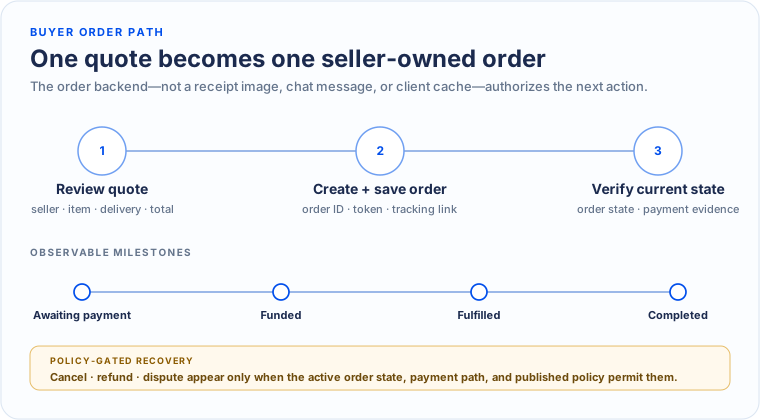
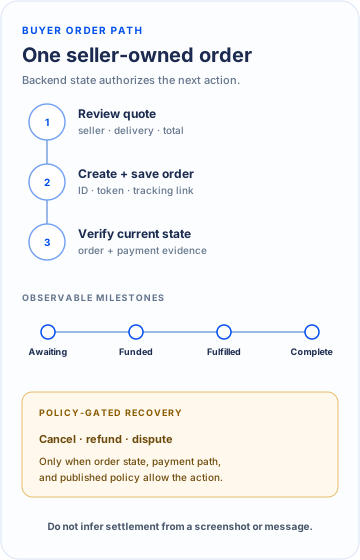
Choose what you need to do
Complete checkout→Create one order from one reviewed quote.Use Guest Checkout→Buy without attaching an account and keep a recoverable tracking link.Track an order→Reconcile payment evidence with backend-owned order state.Respond to order notifications→Use an event to reach the related record, then refresh authoritative state before acting.Cancel, refund, or dispute→Use the transition available for the active order.
The Mobazha purchase model
Mobazha does not treat a product page, wallet transfer, and order as the same record. The buyer journey crosses several explicit objects:
| Object | What it answers | What not to assume |
|---|---|---|
| Store and backend | Who publishes the offer and owns the resulting order state? | A discovery site, community, or Agent does not automatically own the transaction. |
| Quote | Which item revision, option combination, destination, delivery path, discount, and total are being offered now? | A catalog price or old screenshot is not an accepted total. |
| Order | Which quoted terms were accepted, and which state transition is currently valid? | Editing the listing later must not rewrite the accepted order. |
| Payment session | Which asset or provider, destination, amount, expiry, and verification rule apply to this order? | Broadcast, authorization, observation, verification, and settlement are not interchangeable. |
| Recovery path | Which cancellation, refund, buyer-protection, or dispute action is currently available? | Mobazha does not promise one universal recovery action for every payment rail and policy. |
What should be visible before payment
| Decision | What the buyer should see | Governing source |
|---|---|---|
| Who receives the order | Seller identity and the backend or operator serving that store | Store and order owner |
| What the order costs | Item, delivery, tax, discounts, provider or network costs, optional services, final total | Active quote |
| How to pay | Asset, destination, amount, expiry, and required confirmations | Active order and payment system |
| What happens next | Cancellation, refund, fulfillment evidence, and dispute path available for the order | Current order state and published policy |
Before you confirm
- Verify the store identity and the backend or operator serving it.
- Inspect subtotal, shipping, taxes, network costs, service charges, discounts, and the final total.
- Read cancellation, refund, evidence, and dispute rules.
- Treat an agent recommendation as assistance, not as authority to bypass confirmation or spending scopes.
- If a cart contains items from multiple stores, verify the store boundary and quote for each resulting seller-owned order.
Keep evidence
Retain the order identifier, quote, payment reference, messages, fulfillment evidence, and the policy version shown at checkout. These records make support and dispute handling more reliable.
Checkout and payment
- Confirm the item, quantity, variant, seller, shipping destination, and delivery method before requesting a quote.
- Read the full cost allocation: item subtotal, delivery, taxes, discounts, network or provider costs, optional services, and final total.
- Use only the payment method, asset, address, amount, expiry, and confirmation instructions shown for the active order.
- Do not reuse an expired quote or payment destination from another order, message, screenshot, or Agent response.
- Wait for authoritative payment and order state instead of treating broadcast, a pending transaction, or a receipt image as final settlement.
Delivery, cancellation, and disputes
- Follow the cancellation and refund actions currently available for the order rather than assuming a universal deadline.
- Inspect seller delivery evidence and preserve buyer evidence in its original form.
- Use the in-product dispute path when offered and describe the requested remedy clearly.
- A payment rail or escrow can enforce only its implemented conditions; it does not guarantee product quality or a preferred dispute result.
- Escalate suspected fraud or security issues without publishing private order, identity, or payment data.